Advanced usage
Neighbourhood systems and connectivity
Many BIP operators have a -n option to set the connectivity of the neighbourhood system used. When passing 4, 6, or 4,6 as a value for this option, a Von Neumann neighbourhood is used: the neighbours of a pixel or voxel are connected to it by edges parallel to the image XYZ axes (stated otherwise, each neighbour differs by only one coordinate from the center of the neighbourhood). When passing 8, 26, or 8,26, a Moore neighbourhood is used instead (diagonal pixels or voxels are also neighbours).
There is absolutely no difference between the three possibilities for specifying a neighbourhood system. For example, all three values 8, 26, and 8,26 will impose 8-connectivity in 2D and 26-connectivity in 3D. The three possibilities are essentially offered for clarity and consistency. To process 2D images, one would certainly write:
bip labelling -n 8 image2D-A.tif image2D-B.tif
and to process a mix of 2D and 3D images, one may write:
bip labelling -n 8,26 image2D-A.tif image3D-C.tif
but the result would be the same by calling, for example:
bip labelling -n 26 image2D-A.tif image3D-C.tif
Lastly, note the default connectivity is 4 (2D)/6 (3D). Hence, the 4, 6, and 4,6 option values are essentially provided for clarity and for making explicit the choice of the neighbourhood system.
Pairing images by matching filenames
Several BIP operators are binary operators: they take as input two images, the current image to process and an additional image required for the processing of the current image. A typical example is the mask operator, in which a mask image is used to set to zero all values in the input image that are outside the defined mask. Some operators also take as input additional files that are not images. A typical example is the click-select operator, which takes as input a file of selected positions.
Under a well-designed file nomenclature, any additional file (image or else) should have a name that can be automatically constructed from the filename of the currently processed image. For example, a mask could be stored in a masks folder under the same filename as the current image, or with a suffix such as *-mask.tif.
Pairing images having identical filenames
The simplest situation is when no substitution is needed, because additional files are stored in some directory under the same filenames as the processed images (Figure 12). It is then sufficient to specify the path to this directory. For example:
bip mask ../masks ../inputs/*
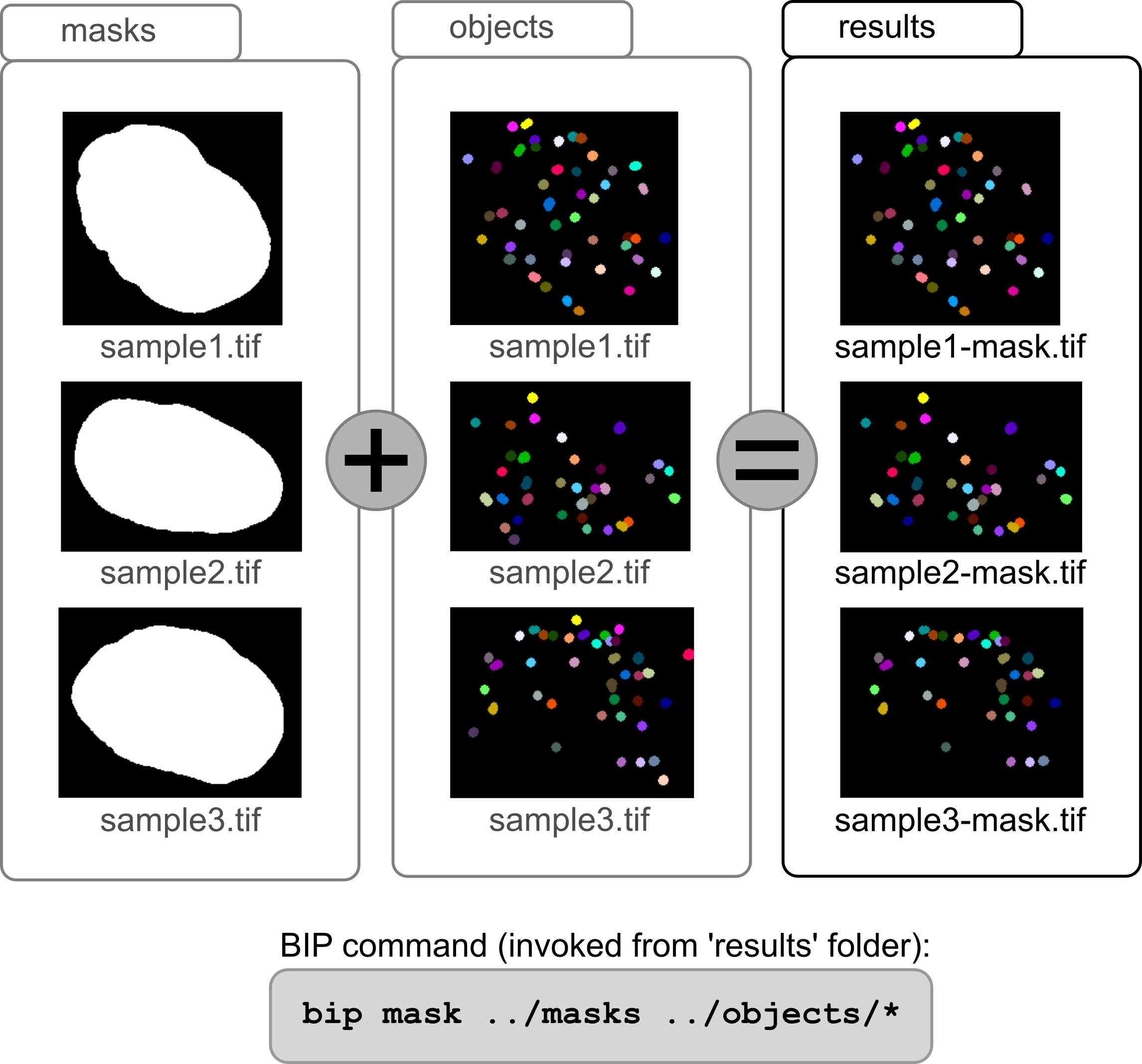
Figure 12 Matching processed image files with additional files (simple situation). Each input image in the objects folder has a corresponding mask image in the masks folder. Specifying the masks folder is sufficient for BIP to associate each object image to its corresponding mask.
Pairing images having distinct filenames
A more complex situtation is when some filename pattern differs between each input image and its associated image. BIP features a pattern substitution mechanism based on regular expressions to automatically construct, from the currently processed image filename, the name of an associated additional file. Pattern substitution allows to replace parts of a filename by some specific pattern. It also allows to remove or add some parts. The position (begin, end, or anywhere) of replacement, removal, and insertion can be specified.
A typical example is when the processed images and their associated files correspond to different fluorescence channels indicated in filenames (e.g., with "c02" and "c01" tags; see Figure 13). In this case, the "c02" pattern in the input filenames has to be replaced by "c01" to associate the processed images to their respective additional files:
bip mask ../masks:s/c02/c01/ ../inputs/*
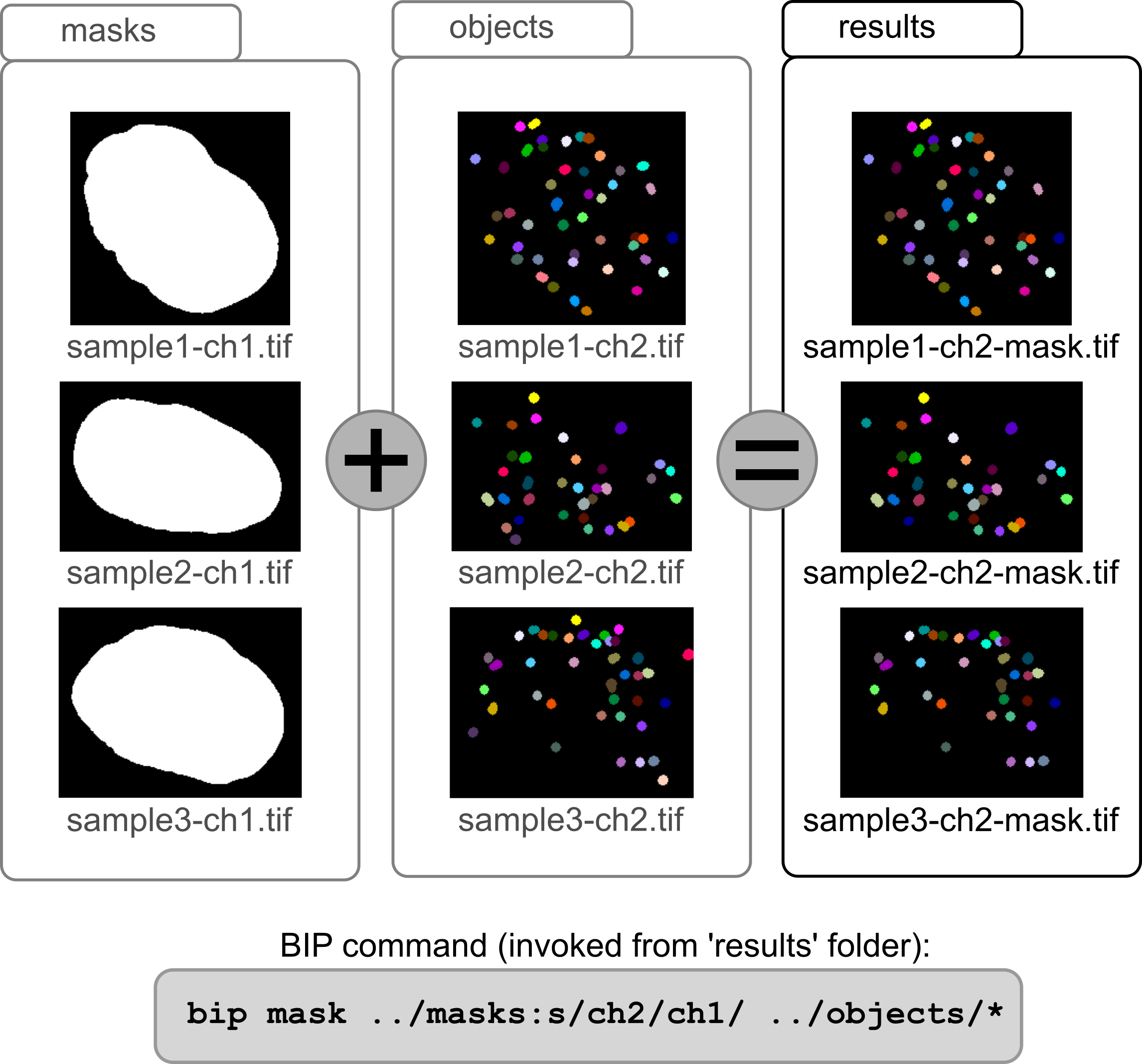
Figure 13 Matching processed image files with additional files (typical situation). Each input image in the objects folder has a corresponding mask image in the masks folder. The only difference in filenames is the channel suffix. A pattern substitution has to be given with the masks folder name to ensure BIP associates each object image to its corresponding mask.
Note how the substitution pattern is separated by a ’:’ character from the directory name. The pattern itself is composed of three parts separated by slashes (’/’): (1) a letter designing an action to perform, here ’s’ for substitution; (2) a regular expression specifying the pattern to match, here the "c02" substring; (3) the motif with which the occurrences of the searched pattern should be replaced, here "c01".
A specific position of the matching pattern in the input filename can be specified using the ’^’ (begin) or ’$’ (end) characters. For example, "s/tif$/vx/" is used to replace the .tif extension of an image by the .vx extension of a file listing a set of positions from which to operate some operation (see, for example, click-select). Similarly, "s/^/mask-/" is used to add the prefix mask- to the image filename.
Several substitutions patterns can be specified at the same time, in which case each pattern should be separated from the previous one by a comma. For example, the call:
bip mask ../masks:s/c02/c01/,s/^/mask-/ ../inputs/*
would look, for each input image, for an associated image in the masks directory with the same filename, prefixed by mask- and in which the substring c02 would be replaced by c01.