Image filtering
attenuation-correction [-p] ball|box <radius> <reference-slice>
This operator filters the input 3D image so as to correct the attenuation of signals with depth, using Biot et al’s method [Biot et al., 2008]. The method relies on the hypothesis that the background of the image should be stationary. Hence, a background image is estimated for each slice and a correction is computed to bring its background average and standard-deviation to that of a reference slice. The background of each slice is obtained by applying a morphological opening. The method is thus appropriate to correct attenuation in image stacks containing relatively small objects such as spots.
The first two parameters of this operator control the morphological opening. See the opening operator for details. The third parameter reference-slice is the index of the slice taken as reference for the correction. It is generally taken as one of the first slices in the image stack.
If the -p option is set, the per-slice average intensity profiles of the original image, of its background estimated based on the morphological opening, and of the corrected image are stored in a dataframe file. This can be used to plot and visualize the strength of the attenuation and the quality of the correction.
gaussian-filter <sigma[,sigmaY,sigmaZ]>
This operator filters the input image by replacing each value by a weighted average of values over its neighbourhood, the weights being set according to a Gaussian function. This is a classical linear filter that is in general used to attenuate noise.
The sigma parameters controls the shape of the Gaussian function. Though the neighbourhood is theoretically infinite, it is truncated at \(\pm 3\) sigma along each direction, i.e., when weights are becoming negligible relatively to the central position.
If only one sigma value is specified, it is used along all image dimensions. If three values are passed, they are used to filter along the X, Y, and Z dimensions, respectively (if the input image is 2D, the sigmaZ value is silently ignored).
If only two values are passed, they are used to filter along the X and Y dimensions (if the input image is 3D, sigmaZ is silently set to 1.0).
gaussian-gradient <sigma>
This operator computes the Gaussian gradient of the input image. The principle of this operation is to apply a Gaussian smoothing followed by a differentiation along each direction (the way it is implemented differs from this description for the sake of efficiency). For a \(N\)-dimensional image (\(N=2\) or \(3\)), the result is a vector image with \(N\) values (samples in the TIFF nomenclature) corresponding to the \(N\) components of the gradient (Figure 3).
The sigma parameter controls the shape of the Gaussian function used at the smoothing stage (see gaussian-filter operator).
The Gaussian gradient is an approximate optimal edge detection filter [Canny, 1986].
This operator cannot be applied to multi-sample input images.
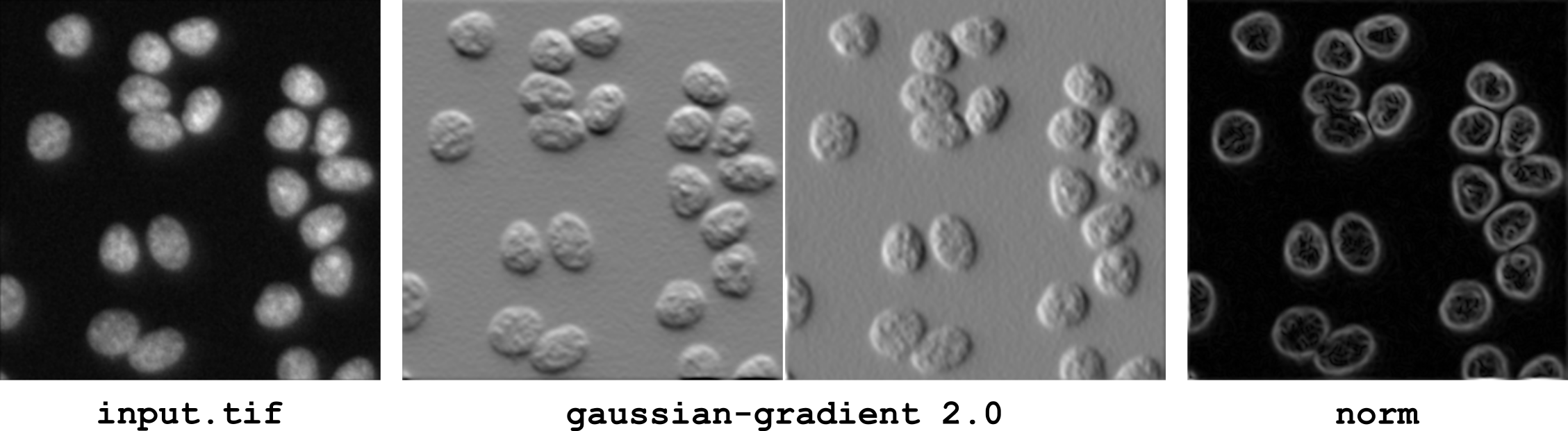
Figure 3 Estimating image derivatives using the Gaussian gradient operator. The operator generates a vector image of the gradient components (Middle). The gradient norm is obtained by applying the norm operator to the vector image (Right).
local-inhibition-filter ball|box <radius>
This operator filters the input image by first setting to zero all values that are below some proportion (scale parameter) of the maximal value of their neighbourhood. In a second step, the obtained image is used as a marker for a geodesic reconstruction of the input image, thus recovering original values for positions associated to significant intensity peaks.
This operator is useful to remove intensity peaks that are considered not relevant in the neighbourhood of relevant (and of higher intensity) peaks. It was initially developed to remove artefacts in 3D-SIM images [Keller et al., 2024].
The first parameter of this filter specifies the shape of the neighbourhood. When set to ball, circular (2D) or spherical (3D) neighbourhoods are used. When set to box, square (2D) or cubic (3D) neighbourhoods are used. The size of the neighbourhood is controlled by the radius parameter.
The scale parameter is fixed to 0.2 (may become an option in the future).
majority-filter ball|box <radius>
This operator filters the input image by replacing each value by the most represented value in its neighbourhood. It is primarily intended to filter label images by removing irregularities at the boundaries of labeled regions. Therefore, the value 0 is ignored. An option may be added in the future to alter this behavior.
The first parameter of this filter specifies the shape of the neighbourhood. When set to ball, circular (2D) or spherical (3D) neighbourhoods are used. When set to box, square (2D) or cubic (3D) neighbourhoods are used. The size of the neighbourhood is controlled by the radius parameter.
mean-filter ball|box <radius>
This operator filters the input image by replacing each value by the average value in its neighbourhood. This is a basic linear filter that is used in particular to attenuate noise.
The first parameter of this filter specifies the shape of the neighbourhood. When set to ball, circular (2D) or spherical (3D) neighbourhoods are used. When set to box, square (2D) or cubic (3D) neighbourhoods are used. The size of the neighbourhood is controlled by the radius parameter.
median-filter ball|box <radius>
This operator filters the input image by replacing each value by the median value in its neighbourhood. This is a basic non-linear filter that is used in particular to attenuate noise. When applied to a binary image, it is equivalent to a local majority voting.
The first parameter of this filter specifies the shape of the neighbourhood. When set to ball, circular (2D) or spherical (3D) neighbourhoods are used. When set to box, square (2D) or cubic (3D) neighbourhoods are used. The size of the neighbourhood is controlled by the radius parameter.
morphological-gradient ball|box <radius>
This operator computes the morphological gradient of the input image. The morphological gradient is the difference between the dilation (local maximum filter) and the erosion (local minimum filter) of the image. One advantage of this operator over linear gradient operators is to be less sensitive to variations in the local curvature of object contours.
The first parameter of this operator specifies the shape of the neighbourhood (structuring element) used in the dilation and erosion operations. When set to ball, circular (2D) or spherical (3D) neighbourhoods are used. When set to box, square (2D) or cubic (3D) neighbourhoods are used. The size of the neighbourhood is controlled by the radius parameter.
prewitt-gradient
This operator computes the Prewitt gradient of the input image. The Prewitt operator is a separable linear gradient operator with smoothing kernel 1 1 1 and derivative kernel -1 0 1. In 2D, for example, the resulting kernel to compute the horizontal component of the gradient is thus:
The Prewitt gradient is generally of little interest on biological images. It is essentially provided for historical and pedagogical reasons, and may be useful in very specific applications.
sobel-gradient
This operator computes the Sobel gradient of the input image. The Sobel operator is a separable linear gradient operator with smoothing kernel 1 2 1 and derivative kernel -1 0 1. In 2D, for example, the resulting kernel to compute the horizontal component of the gradient is thus:
The Sobel gradient is generally of little interest on biological images. It is essentially provided for historical and pedagogical reasons, and may be useful in very specific applications.
unsharp-mask-filter <alpha> <sigma>
This operator filters the input image by performing an unsharp mask operation. This operation consists in adding to the image some proportion of the difference between the image and a smoothed version of it. The net effet is to enhance the local contrast by making transitions at the boundary of objects sharper.
The parameter alpha controls the proportion of difference added to the original image. Only positive values should be passed. The larger the value, the larger the contrast enhancement. The parameter sigma is passed to the Gaussian filter used to smooth the image. Its value should be adapted to the width of the transitions to be enhanced (i.e., to the degree of blur in the input image).
variance-filter ball|box <radius>
This operator filters the input image by replacing each value by the variance of the values in its neighbourhood. It may be used for example to enhance positions were important intensity variations occur or can be used as a basic texture analysis tool.
The first parameter of this filter specifies the shape of the neighbourhood. When set to ball, circular (2D) or spherical (3D) neighbourhoods are used. When set to box, square (2D) or cubic (3D) neighbourhoods are used. The size of the neighbourhood is controlled by the radius parameter.